
CitationNet is a platform that makes it easy to visualize the connections between publications over time.
Enter a PubMed or OpenAlex ID — or look a paper up by title or author — and CitationNet builds an interactive map of the papers around it: what it cites, what cites it, and how they connect over time.
How it works
Every search runs live against OpenAlex, so each network is built fresh. Most appear within a few seconds; the biggest ones take longer.
What it does
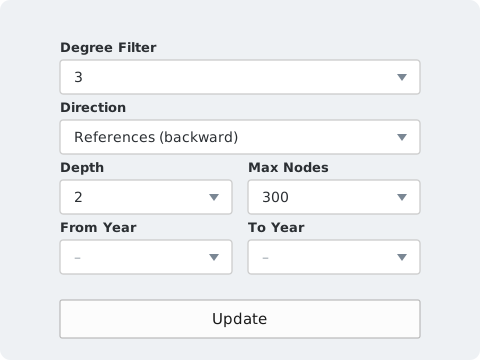
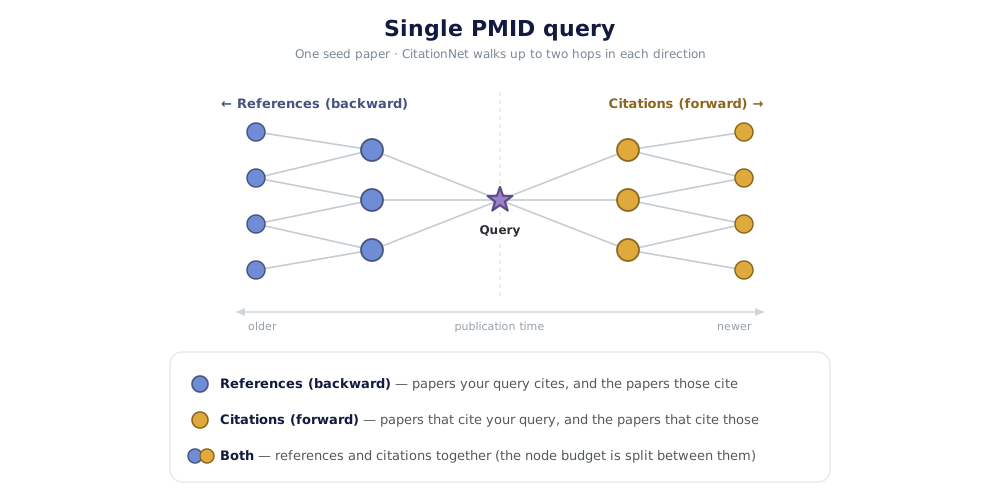
CitationNet looks each work up in the OpenAlex scholarly database — by its PubMed ID, its OpenAlex ID, or a title or author match — then assembles the works around it into a single network. Two settings shape what you get back:
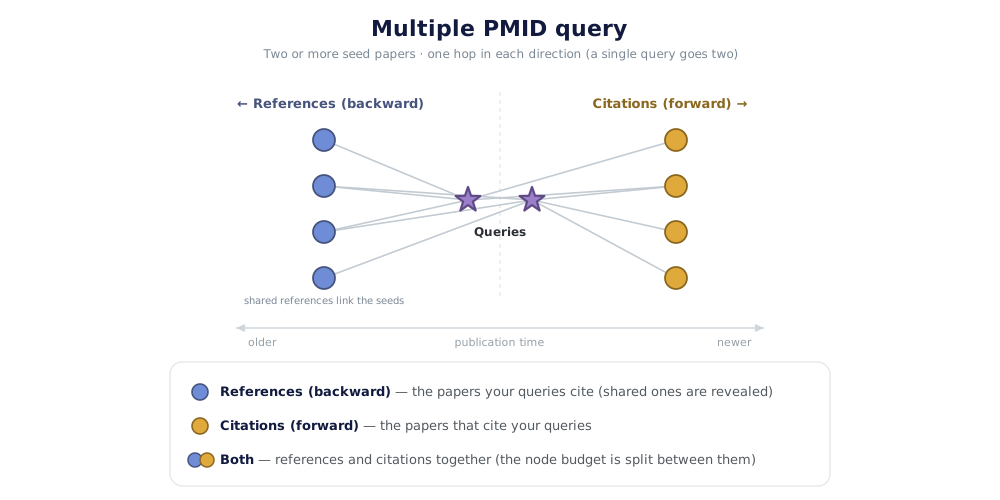
How to read the graph
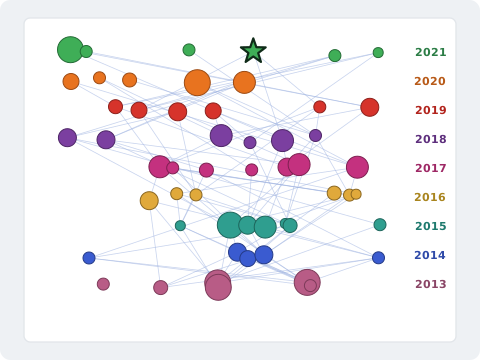
The network is drawn with a Cerebral layout. Every work sits in a horizontal band for its publication year — newest at the top, oldest at the bottom — so following an edge downward means tracing a citation back through time.
Working with your results
- Click a paper — either its dot in the graph or its row in the results table — and its details open in a panel over the search box: title, authors, journal, date, abstract, and the lists of works it cites and works that cite it. At the same time the paper, its neighbours and the links between them turn red and its table row is picked out in yellow. Clicking the same paper again undoes all of it; so does the panel’s × button or the Esc key.
- Read the results table: one row per paper, showing the title, its authors and journal, the year, how many works in the network it cites, how many cite it, and its total citation count from OpenAlex. The year, count and citation columns all sort. Rows carry a ★ Query tag for a paper you searched for, Shared foundation for one cited by several of them, and Retracted where OpenAlex records a retraction, and Preprint where it records the work as a preprint.
- Filter by node degree — the number of in-network connections — to hide loosely connected works and let dense graphs breathe.
- Hide preprints by ticking Hide Preprints beside the degree filter, which drops works OpenAlex records as preprints — bioRxiv, medRxiv, arXiv, SSRN, Research Square and similar. Switching it costs no new search, and the status line reports how many went. Two caveats worth knowing: OpenAlex’s labelling is imperfect, so treat this as a guide rather than a guarantee; and a preprint and its published version are separate records, so hiding the preprint also breaks any citation link that ran through it. A paper you searched for is always kept, even when it is a preprint.
- Filter by title or abstract — type a term and the table narrows to matching works while the graph dims the rest.
- Group the network with the Topics, Clusters and Authors buttons above the table. Topics tallies the subjects OpenAlex assigns the papers; Clusters finds groups that mainly cite one another and names each after the subject its members share; Authors lists the people who lead or close two or more papers in the network. Click any entry and the graph dims everything outside it while the table shrinks to just those papers, until you clear the selection.
- Remove a paper you did not want using Remove Node From Network in its details panel — useful when a broad review drags in a cloud of loosely related work. Removed papers are listed in a bar above the results, where you can put any of them back, or choose Rebuild search without them to run the search again so those papers, and everything they would have brought with them, are left out from the start and their slots go to other work. The papers you searched for cannot be removed.
- Download the network as a table (TSV), a graph file (GraphML or GEXF), an edge list (CSV), or a PNG image. The TSV follows what is on screen — it contains the rows the table is currently showing, and records any keyword filter at the end of the file. The graph, edge list and image always cover the whole network as drawn. In the TSV each paper is named by its PubMed ID, or its OpenAlex ID when it has none; the graph and edge-list files use OpenAlex IDs throughout, with the PubMed ID kept alongside as a separate field in GraphML and GEXF.
- Open or export a single paper’s lists: each of the two lists in the details panel — what it cites, what cites it — has its own CSV button, alongside PubMed and OpenAlex buttons that open every paper in that list in new tabs. The same pair of buttons above the results table opens everything currently listed.
Why it is useful
Laid out in time, a literature reveals its own shape. Three patterns are worth watching for.
Credits & data


Please review the Terms of Use before using CitationNet.